Finish an activity and plan the next one
Ma journée organizes work to handle and helps keep an explicit next step for each record.
Before you start
Open an active workspace with access to the relevant records. Check the date, time zone and filters before interpreting an empty list.
Create the next action
From the sale record, choose Planifier une action. Enter the subject, type, priority, owner and due date. A date-only task can have no time. After Créer l’action, check the save confirmation, the task linked to the sale and its presence in Ma journée.
For an Appel (call) action, first add the telephone number to the contact record. If the call is refused because no number is available, complete the record and return to the retained draft. Scheduling a task does not place a call.
Steps
- In Ma journée, review overdue, today, upcoming, waiting and undated activities.
- Open the activity and linked record; perform the work before completing it.
- On resolution, choose a dated next activity, dated waiting state with a reason, or no follow-up with justification.
- To postpone, give a new date and reason. Cancel an unnecessary activity instead of marking it completed.
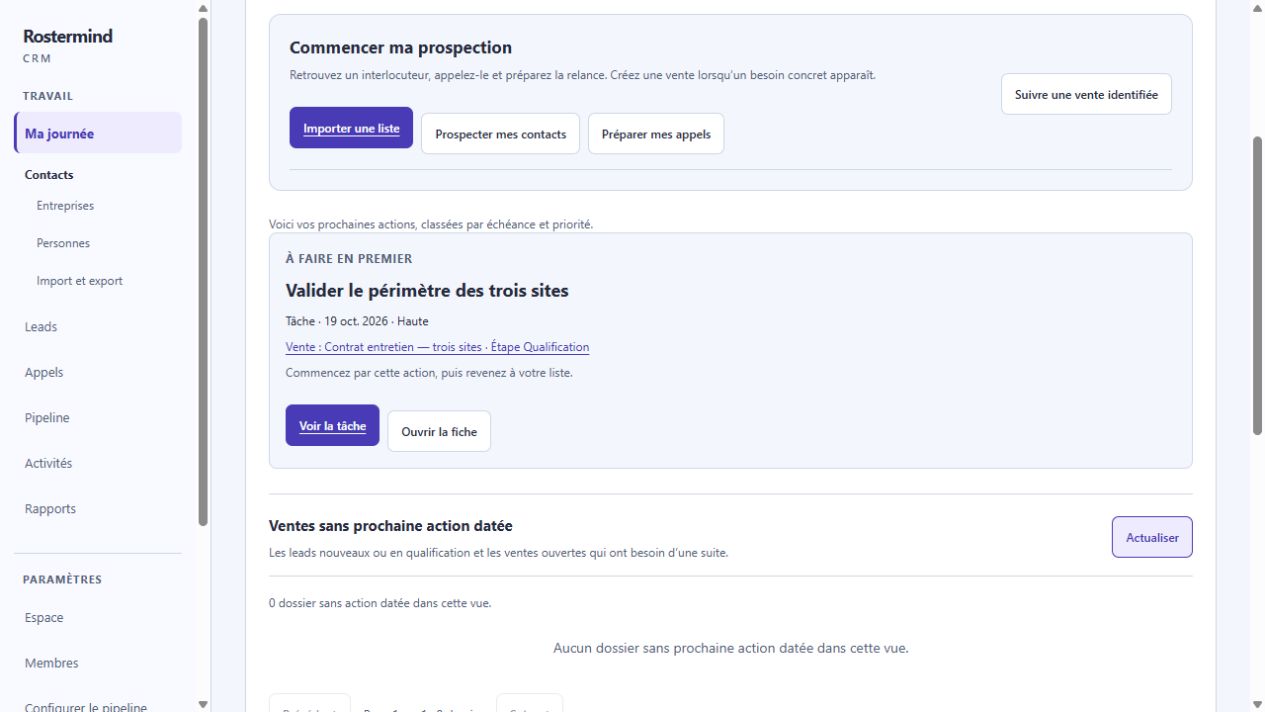
Actual French screenshot, staging, October 17, 2026. The workspace and demonstration records are entirely fictional.
Example and expected result
Situation : The fictional three-site sale needs a scope review. Valider le périmètre des trois sites is due October 19, 2026, without a precise time and with high priority.
Actions : Use Planifier une action from the sale, enter details and check saving. Open Ma journée and find the task with its linked sale.
Expected result : The action stays open and upcoming until work is performed. After the actual result, choose its continuation through the resolution workflow.
Limits : The screenshot proves preparation of this date-only action, not completion. A precise time still requires a successful save if a message rejects it; do not remove a time required for an appointment.
If something goes wrong
A record without a dated activity may disappear from your daily program without being finished. Review records missing a next activity. After an uncertain response, read the history before creating a duplicate task.
A refusal asking for a telephone number lets you edit the draft before submitting again. If the service is unavailable and offers Reprendre la création de l’action (resume creating the action), use that recovery without creating another request; confirmation may still be pending.
If a time is rejected, check the time and displayed time zone. If correct values are still rejected, contact support; do not treat the action as saved. Do not remove a time required for an appointment to get past the message.