Move a sale through its pipeline
An opportunity tracks a sale through a pipeline and stage. Each stage change should reflect a confirmed commercial fact.
Before you start
You need opportunity editing rights. Convert an existing lead rather than recreating it, to retain continuity.
Steps
- Open Pipeline and select the relevant sales pipeline.
- Open or create the opportunity with a title, contact, known amounts, currency and expected closing date.
- After a conversation, update its stage and schedule the next dated activity.
- At the final decision, choose Gagner or Perdre, provide the requested reason and explicitly handle remaining open tasks.
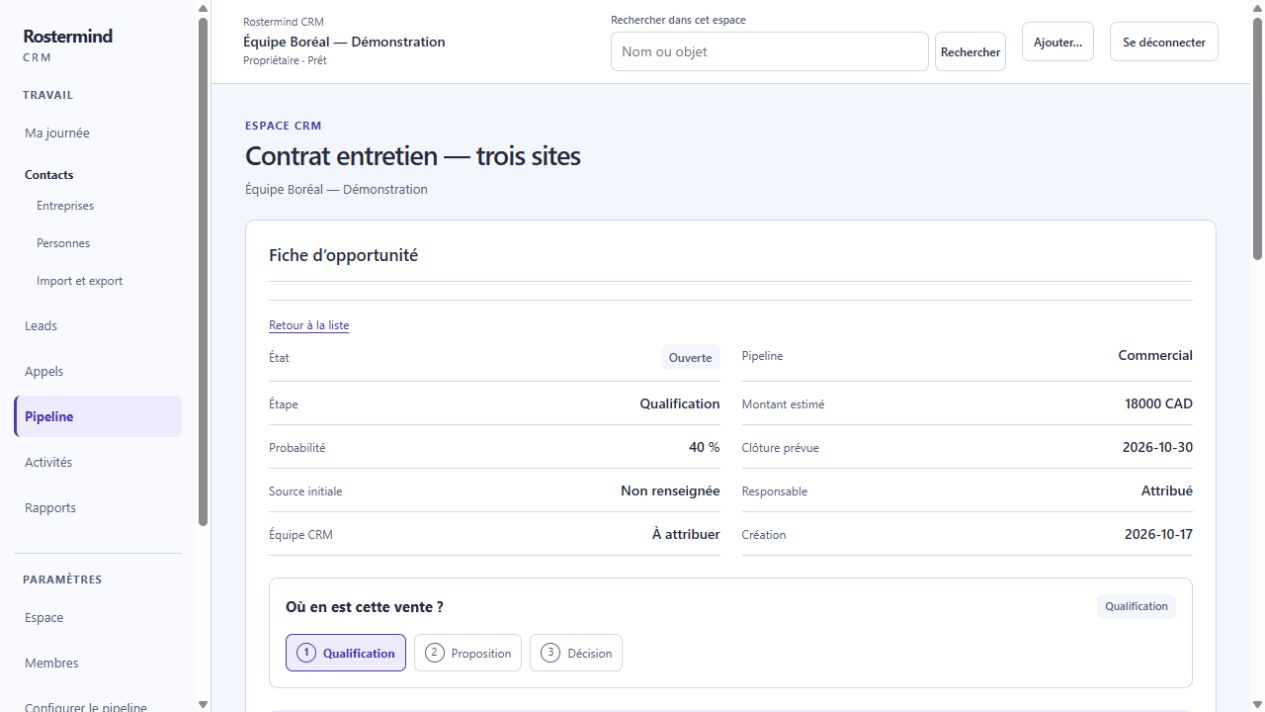
Actual French screenshot, staging, October 17, 2026. The workspace and demonstration records are entirely fictional.
Example and expected result
Situation : The screenshot shows fictional Contrat entretien — trois sites, open at Qualification, with CAD 18,000 estimated and 40% probability.
Actions : Check company, contact, need and next action. In this teaching continuation, move to Proposition only when the conversation justifies it.
Expected result : The record should retain the chosen stage and an explicit next step. Final win or loss and handling open tasks require their own actions.
Limits : The screenshot remains the initial Qualification state; it does not show an executed closure. Estimate and probability are neither an invoice nor a payment.
If something goes wrong
After an editing conflict, reload the record before moving stages. Canceling an unnecessary task does not mean it was performed. Pipeline configuration requires administrative permission and does not replace following up the sale.