Check your CRM subscription
CRM commercial access belongs to the workspace. It is separate from Rostermind Operations plans, workers and options.
Before you start
The owner can view Abonnement CRM in workspace settings. The verified workflow displays test payments; this guide does not describe a live subscription as available.
Steps
- Open settings for the correct workspace and read Accès aux données CRM: active, read-only, trial ended or not activated.
- Under Abonnement CRM, check active members, seats, state and period. Every active member, including read-only members, uses a seat.
- If a request exists, use Actualiser and read its state before taking another step. Confirmed payment may still await access reconciliation.
- For live commercial activation, have the responsible service confirm the workflow and terms. Do not enter a real card into a test workflow.
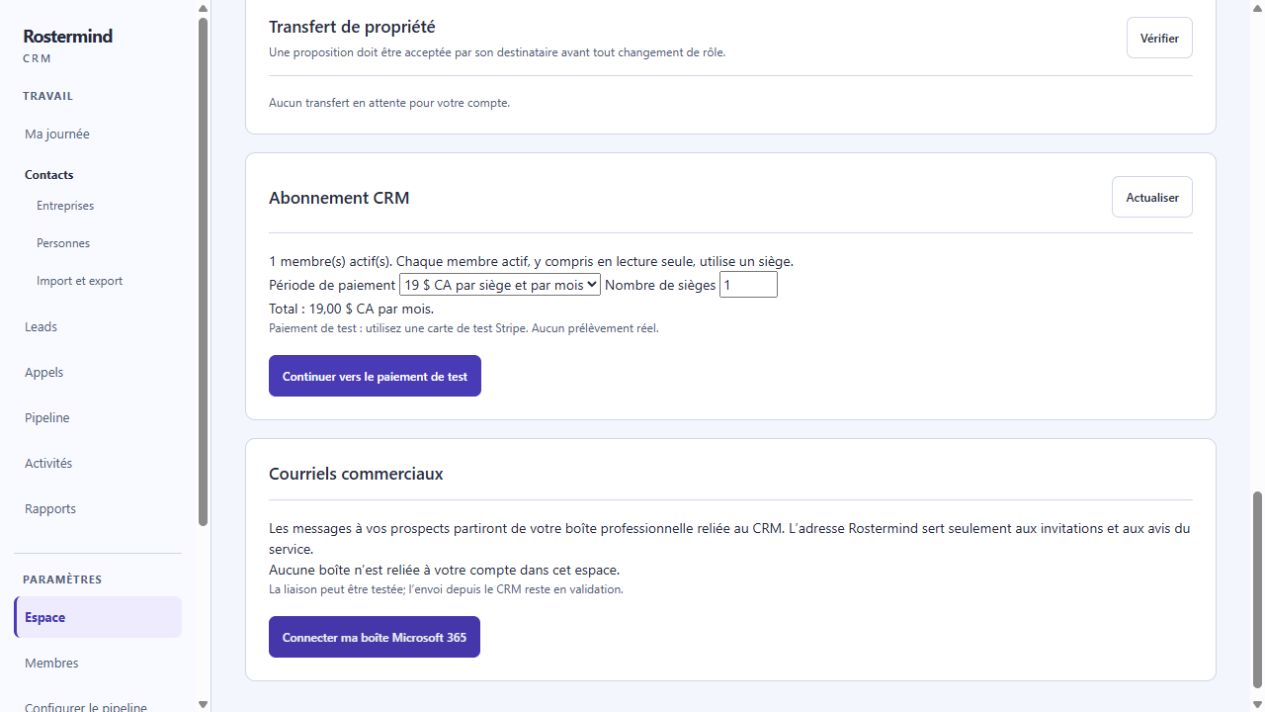
Actual French screenshot, staging, October 17, 2026. The workspace and demonstration records are entirely fictional. The amounts shown belong to this test flow; they do not confirm a production commercial offer. No payment was made.
Example and expected result
Fictional example: four active members, including one read-only member, require four seats. They are not the “ten included workers” of an Operations plan. Preparing payment alone does not restore access.
If something goes wrong
Do not duplicate a request requiring review. If access remains unavailable after payment, refresh and contact support with the workspace and displayed state. Scheduled cancellation does not delete data; read its effective date.